
2 year warranty


Gaming beyond innovation
Be prepared to get stunned by the precise color reproduction of Evnia OLED gaming monitor. The innovative Ambiglow redefines what gaming environment usually is, levelling up not only your game gear, but also your gaming experience.
Gaming beyond innovation
Evnia 8000
42 (41.54" / 105.5 cm diag.)
3840 x 2160 (4K UHD)

OLED display for lifelike visuals with deeper black details
This Philips OLED display delivers a wider viewing angle and a uniquely lifelike visuals. Deeper black for stunning viewing experience. Details in shadows and highlights are precisely reproduced.
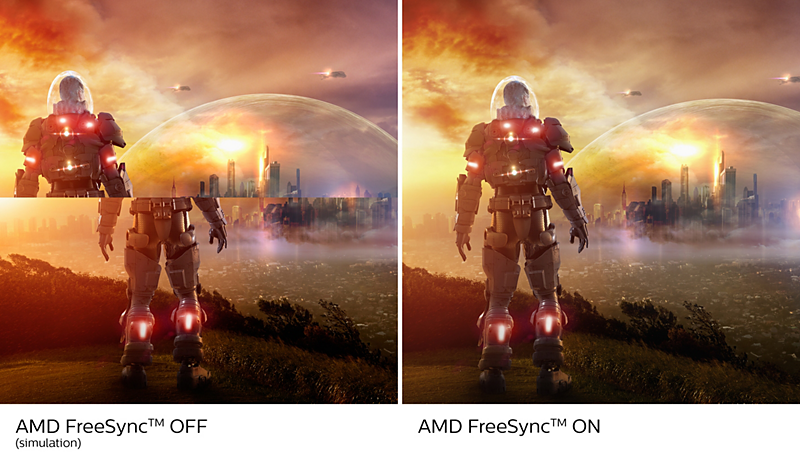
AMD FreeSync™ Premium; tear free, stutter free, fluid gaming
Gaming shouldn't be a choice between choppy gameplay or broken frames. AMD FreeSync™ Premium equips serious gamers with a fluid, tear-free gameplay experience at peak performance. There are no compromises, game confidently with a high refresh rate, low framerate compensation, and low latency.

VESA ClearMR 8000: for trusted, high-quality imagery
Previously, methods to test blurry imagery were measured through MRPT. VESA Certified ClearMR acts as an alternative to MRPT and blur is tested with a digital high-speed camera. For monitors that are sent in and certified through VESA Certified ClearMR, you can rest assured that you will have an accurate assessment of the monitor's blur quality. Each certification is defined through a CMR range, with the highest tier being VESA ClearMR 8000. With this monitor being ClearMR 8000 classified, it has one of the highest classifications of image quality, meaning less overall blur.
Technical Specifications
Reviews
1.0
of 5
1
Review
flby
13/07/2025

United Kingdom
Decent panel, atrociously bad at everything else
Some of the issues with this monitor include: - it randomly decides to stop providing power over USB in the middle of the night and some days you wake up to find your laptop completely drained - the "KVM" functionality is a joke, USB fails to switch to the device selected for video input - when one of the computers connected to it is switched off, you can't switch USB input to another - the menu just displays the language options and nothing else - it takes over a minute to switch on, so the screensaver times out and switches it off again ad nauseum - the remote randomly stops working (even with fresh batteries, and the IR led does light up but the monitor is ignoring the signals) - updating the firmware requires finding and downloading (not easy!) a "SmartControl" application that only works on Windows - a bit pointless though as there are never any firmware updates
Pros
Good OLED panel
Cons
Very bad as a computer monitor
This review was made for Gaming Monitor 42M2N8900 OLED gaming monitor
Date of Use 2024-07-13
This review was made for Gaming Monitor 42M2N8900 OLED gaming monitor
Date of Use 2024-07-13
For best output performance, please always ensure that your graphic card is capable of achieving the maximum resolution and refresh rate of this Philips display.
Response time value equal to SmartResponse
DCI-P3 Coverage based on CIE1976
NTSC Area based on CIE1976
sRGB Area based on CIE1931
Adobe RGB Coverage based on CIE1976
For USB-C power and charging function, your Notebook/device must support USB-C standard Power Delivery specifications. Please check with your Notebook user manual or manufacturer for more details.
For Video transmission via USB-C, your Notebook/device must support USB-C DP Alt mode
2020 Advanced Micro Devices, Inc. All rights reserved. AMD, the AMD Arrow logo, AMD FreeSync™ and combinations thereof are trademarks of Advanced Micro Devices, Inc. Other product names used in this publication are for identification purposes only and may be trademarks of their respective companies.
The monitor may look different from feature images.